converter
about
screenshots
driver support
download
alternate
download site
SciTech Display Doctor
SciTech has released their respected Display Doctor products for free
now - great for adding very fast vesa support to a huge number of video
cards for many applications. If your video card doesn't like converter,
or converter's graphics engine doesn't perform as quickly as it would
normally, click here to visit our
support page, read more, and grab it from SciTech's web site.
user forum
Got questions about converter, or having problems getting it working
with your particular hardware? take a look at or drop a post in our forum
for quick answers....
Click here to check
it out...
mailing list issues
Due to some abuse of our mailing list (people submitting false addresses
or other individual's email addresses), we have temporarily chosen to
not use our list to inform our current users about new upgrades. When
we have time, we will be implementing a confirmation system, and will
send confirmation emails to all our existing users to ensure that we do
not send unwanted emails to any individuals. You can still submit your
email address if you like, as these issues will eventually be dealt with.
We apologize for the inconvenience in not being able to let everyone
know about upgrades in a more efficient fashion, but for the time being,
just check back here from time to time to make sure you're not missing
out on anything.
|
march 8 / 05

it's here!
It took a while for this to be released, due in large part to a strong
desire to be extra thorough with this version to make sure everything
was well tuned, tested (on some 30+ machines), and in place... and we
hope it's paid off. Sorry for the wait!
Many substantial improvements, new features, and critical bug fixes.
Version 1.4 suffered from certain problems (several of which were significant)
which have been cleaned up in this release.
Be sure to upgrade to this version. This is definitely the most
important upgrade to converter that we've ever released.
Download the new version here,
or check out the new manual here.
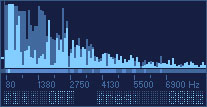
The above snapshot is of one channel of spectral analysis in the new
version, with temporal peak hold and bandwidth activity analysis.
Some of what's in the new version (check the manual
for full details):
- 2 channels of ultra-fast (50fps+ on a P-100) spectral analysis with
bandwidth activity analysis and approximate frequency detection, useful
for diagnostic purposes as well as for programming the filters and audio
to midi subsystem of converter
- aggressively optimized code resulting in huge performance gains
- giant timecode (smpte) and midi clock display panel readable from
across a large room
- significantly improved graphics performance
- bootup system profiling and adjustment
- improved hardware support with better compatibility
- improved, careful subsystem re-designs
- easier installation and use, especially for new users
- many bugs, some critical, fixed
Even though this is the final version of converter for DOS, check back
here from time to time this year for new Windows production software we're
currently developing - Mac OSX users too!
Thanks to all our users out there for your support and feedback - it
has been of great assistance to us along the way. What started out as
an in-house experimental project never-to-be-released has gone much, much
further than we ever expected. Thanks for putting all your trusty old
PCs to good use!
-tom
|
